SeedGen Prompt Guide for Cinematic AI Video
In the rapidly evolving world of SeedGen AI video generation, mastering the right prompts is essential. The capabilities of the SeedGen AI Video Generator allow creators to produce stunning cinematic visuals that were once impossible. However, many users find that while others generate blockbuster-quality movies, their own SeedGen creations sometimes fall short.
The secret to unlocking the full potential of SeedGen lies in the Prompt.
This comprehensive SeedGen prompt guide compiles a set of exclusive, ready-to-use techniques tailored specifically for SeedGen. From basic formulas to advanced camera movements, no complex learning is required—just copy and use these SeedGen prompts to instantly master text-to-video, image-to-video, multi-shot scheduling, and character consistency.
1. The Core Structure (Universal Formula) for SeedGen
To generate stable, high-quality videos using SeedGen, please memorize this universal formula designed to guide the SeedGen AI video generator:
Subject + Action + Scene + Lighting + Camera Language + Style + Quality + Constraints
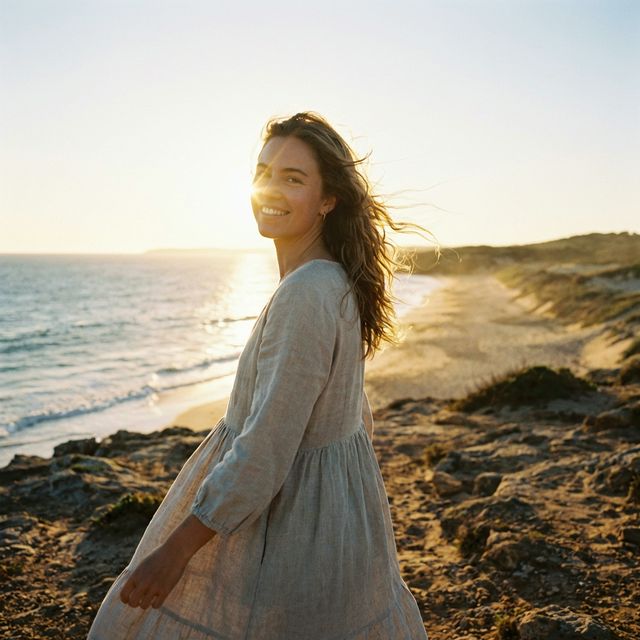
Example Template for SeedGen:
A young woman walking slowly by the seaside, breeze blowing her hair, smiling at the camera, golden hour warm light, 4K high definition, cinematic feel, stable camera movement, smooth picture without shaking, clear details.
This SeedGen prompt formula ensures that the SeedGen AI obtains all necessary information dimensions, avoiding random and uncontrollable hallucinations common in AI video generation.
2. Action Description Techniques (SeedGen Loves This)
SeedGen has a high level of understanding for nuanced actions, but you need to use the right words to guide the SeedGen model effectively.
SeedGen Core Principle: Do not just write dry words like "dancing" or "walking"; describe them as continuous, natural, and slow motion to get the best out of SeedGen.
- Prioritize for SeedGen: Slow, gentle, coherent, natural, smooth, not stiff.
- Avoid in SeedGen: Exaggerated, high-speed, complex multi-person interaction, large distortions.
Good Verb Combinations for SeedGen:
- Slowly turning around, gently raising hand, steps moving lightly, slightly lowering head, swaying with the wind
- Camera slowly pushing in, slight orbit, steady follow shot
These nuanced descriptions help SeedGen generate fluid motion.
3. Camera & Movement (Instantly Boost Cinematic Feel in SeedGen)
SeedGen has extremely strong recognition capabilities for professional camera terminology. Directly adding these terms to your SeedGen prompt can instantly enhance the "premium feel" of your SeedGen AI video.
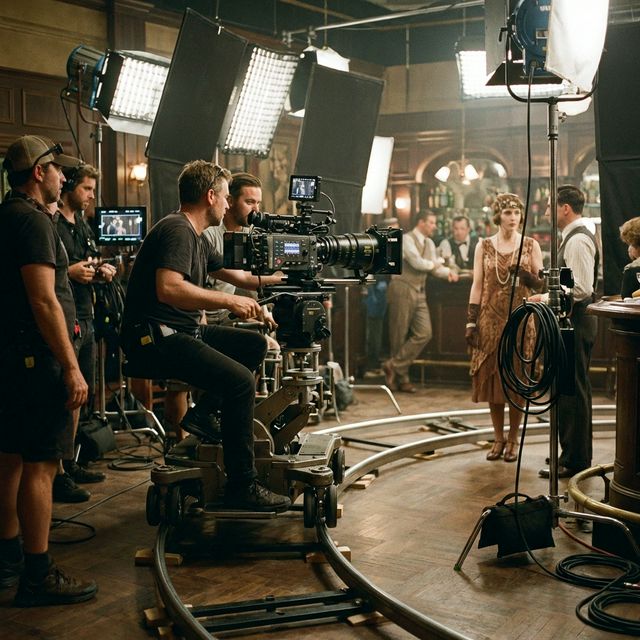
Best Camera Angles for SeedGen:
- Shot Size: Close-up / Medium Shot / Full Shot / Extreme Close-up
- Movement Methods:
- Slow Dolly In
- Slight Pull Back
- Smooth Truck (Horizontal Move)
- Orbit (Half Circle)
Stability Keywords for SeedGen:
- Fixed camera, handheld stability, no shaking, silky smooth
Practical Example:
Medium shot, slow dolly in, stable follow shot, picture silky smooth without stutter.
Using precise camera language is key to directing the SeedGen AI Video Generator effectively.
4. Character/Person Stability in SeedGen (Prevent Face Changing)
Character consistency is a major challenge for AI video creators. In SeedGen, you must explicitly add constraint words to your SeedGen prompts.
Key Constraint Words for SeedGen:
- Clear facial features, stable face, no distortion, no deformation
- Normal human body structure, natural proportions, movement not stiff
- Same character, consistent clothing, unchanged hairstyle
Practical Example:
Character face stable without deformation, normal human body structure, movement natural and smooth.
These constraints help SeedGen maintain identity across frames.
5. SeedGen Picture Quality (Must Add, Enhance Clarity)
Just like turning on the "high quality" switch for your video, weld these words to the end of your SeedGen prompt to ensure the best output from SeedGen:
Universal Quality Words for SeedGen (Copy Paste):
4K, ultra-high definition, rich details, clear sharpness, cinematic texture, natural colors, soft lighting, no blur, no ghosting, no flicker, stable picture.
High-quality descriptors are crucial for SeedGen to render detailed textures.
6. Style & Atmosphere in SeedGen
Choose suitable style words according to the theme you want to express with SeedGen:
- Daily/Vlog: Healing fresh, beautiful literary, Japanese fresh, Korean atmosphere
- Sci-Fi/Blockbuster: Cyberpunk, dark premium, retro film, dreamy soft light
- Minimalism: Minimalist clean, premium texture, real photography
SeedGen excels at replicating these distinct visual styles.
7. Multi-Shot/Storyboard Writing (A SeedGen Strength)
SeedGen can understand chronological order better than many other models. Try to describe camera changes in a narrative way within your SeedGen prompt, rather than fragmented keywords.
Example SeedGen Narrative:
Beginning with a close-up of the face, slowly pulling back to a full shot, the character walks slowly, the camera follows steadily, ending with a freeze-frame smile.
Leveraging this narrative capability makes SeedGen a powerful tool for storytellers.
8. Avoidance Guide for SeedGen (Never Write)
To avoid wasting credits on the SeedGen AI Video Generator, never step into these pits when writing for SeedGen:
- ❌ Complex Multi-person Interaction: Such as fighting, shaking hands, hugging, etc., easy to clip through models in SeedGen.
- ❌ Vague Words: Such as "good looking", "very beautiful", "very cool", SeedGen has difficulty understanding your needs through these subjective words.
- ❌ Contradictory Requirements: Such as "ultra-high speed running" while requiring "extremely stable without blur."
- ❌ Sensitive Content: Pornography, violence, dangerous actions, copyrighted figures.
9. Directly Copyable Universal SeedGen Templates
To make it easy for everyone to get started with SeedGen, I have compiled templates for three high-frequency scenarios. Copy directly into SeedGen and fine-tune the subject as needed.
Template 1: Beautiful Portrait Short Video (Suitable for Social Media)
A young woman walking slowly in the forest, breeze gently blowing hair, natural smile, warm lighting, medium shot, slow dolly in, picture smooth and stable, 4K high definition, cinematic feel, face clear without deformation, normal human body structure, rich details.
Template 2: Atmospheric Scenery (Empty Shot Material)
Seaside sunset, waves gently lapping the beach, camera slowly trucking horizontally, warm orange tone, healing fresh, picture silky smooth, 4K ultra-high definition, no flicker no ghosting.
Template 3: Image-to-Video (First Frame Fixed, Prevent Collapse)
Based on reference image maintain character appearance and clothing consistency, action slow hand raising and turning around, natural and smooth, not stiff not deformed, stable camera movement, HD details, cinematic texture.
Summary of SeedGen Techniques
- Write Actions Slow & Continuous: Slow motion produces the best quality in SeedGen.
- Write Camera Movement Stable & Simple: Leave complex camera movements to post-production, seek stability when generating with SeedGen.
- Must Add Stable/No Deformation/Not Stiff: This is the fuse for SeedGen picture quality.
- Quality + Style at the End: Ensure a good foundation for your SeedGen videos.
- Do Not Write Intense, Complex, Multi-person: Play to SeedGen's strengths and avoid weaknesses.
Master these skills, and you will be a skilled SeedGen operator. Go try generating your first "cinematic" shot with SeedGen!